
RVD.AI · Version 2.3.0
The new platform reaches its first schools.
RVD.AI opens in early access: classrooms connected to the school's roster, activities created with AI, and a teacher who decides what each student sees.
WHAT'S INCLUDED
The changes in this update.
Home
A new platform, designed from the classroom
Everything your class needs, on a single home screen.
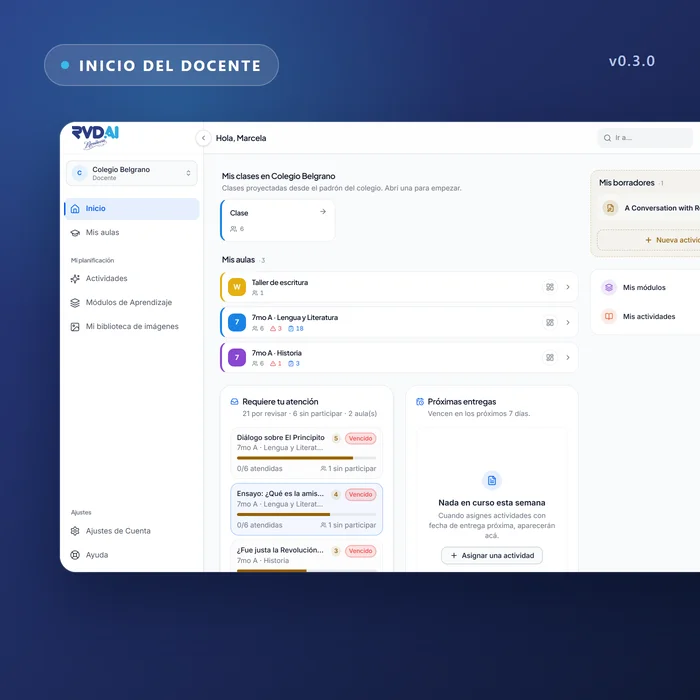
RVD.AI replaces the previous platform with a foundation built from scratch. The teacher's home brings together their classrooms, their drafts, what needs attention and the upcoming due dates. The menu has seven destinations and stays easy to read at whatever text size you chose in your browser.
My classrooms
Classrooms built from the school's roster
Each classroom comes from the divisions the school loaded: students, subject and teacher are already in place. The classroom has a code and a link to open a live class, and tabs for its activities, its modules and the people in it.
Activities
Twelve activity types, with AI or on your own
Guided conversation, debate, writing, multiple choice and more. Each activity states its rubric and its objectives, and the AI supports the student within the purpose you defined. You can build it with help from the AI or fill in each section yourself.
Reference material
You decide what material the student sees
The documents and images you attach to an activity stay with the content. Each one has a switch: visible to the student, or for the AI only. What you upload yourself is visible; what came from an AI generation stays as your source, hidden until you open it up.
Students
The student sees what comes next
The student's home brings together what they need to continue, the upcoming due dates, their classrooms and the state of their competencies. An objective that was reached says so, in one word; the achievement scale is gone from their screens.
Dashboard
The school sees its adoption and its week
School leaders have a dashboard with the health of each cohort, the classrooms that need attention and AI usage per teacher, with a weekly reading that opens up as the days go by.
Sign-in
Invitations and consent before the account
An invitation opens only from the account it was sent to. Age and consent are settled before the account is created, for every role, and the sign-in screens speak the language of whoever is signing in.