RVD.AI · Version 2.6.0
Modules that get published, content that travels.
A published module is frozen and gets duplicated to change it, content from the previous platform arrives with its images, and the activity's language governs everything the AI writes.
WHAT'S INCLUDED
The changes in this update.
Modules
Published means published: the content is frozen
What your students already saw is still what they worked on.
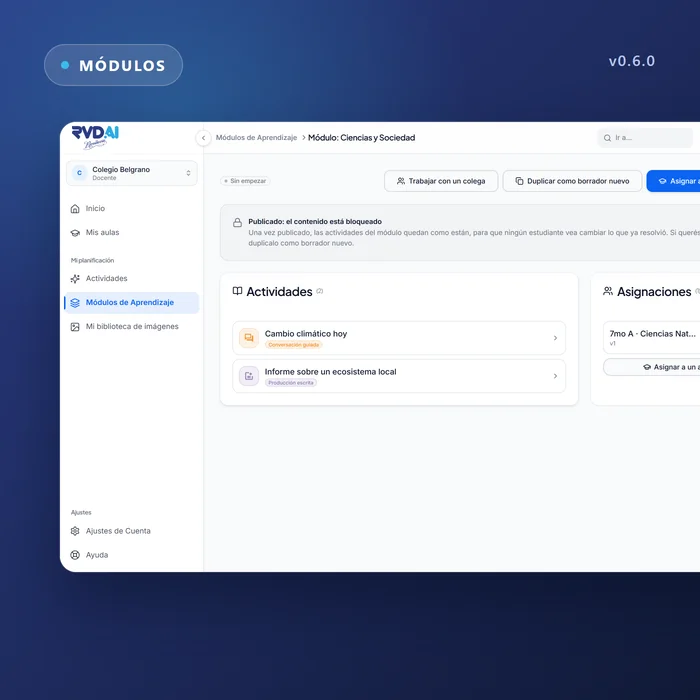
A published module can no longer be edited by accident: to change it you duplicate it as a new draft. Before publishing you see a preview list of which activities go out with the module and which stay behind. The catalog shows a single shelf of published modules, whether the module is planned, in progress or closed.
Modules
Your content from the previous platform, ready to use
The activities and modules you created in the previous version are imported as drafts marked as migrated, with their cover images. You review them, adjust them and publish them whenever you want.
Roster
Rename classrooms and build divisions from classrooms
Teachers and administrators can rename a classroom from its menu or from its detail page. The school can create a division from the classrooms that feed it, with a preview of the cohort before confirming.
Roster
A single list of people
The roster, a division's detail and the people search share the same list: fixed columns, multiple selection and an access indicator for each person. The division detail has its own address.
Activity creator
The activity's language decides
An activity created in English produces its instructions, character, objectives and rubric in English. Choosing the language is required when you create it, and voice and speech recognition follow that language, whatever the language of your interface.
Accessibility
Typography and contrast reviewed across the platform
A single type scale for teacher, school, student and operations, with AA contrast, a minimum legible size and fonts served from the platform.
Legal
Terms, privacy and data agreement, published
The three legal pages can be read directly on the platform, at the address the documents state. Only the student's first name reaches the AI model.