
RVD.AI · Version 2.11.0
Create as a team and bring your history.
Two teachers in the same draft, the previous platform's archive one click away, a creator that asks one thing at a time, and an academic year the school declares.
WHAT'S INCLUDED
The changes in this update.
Modules
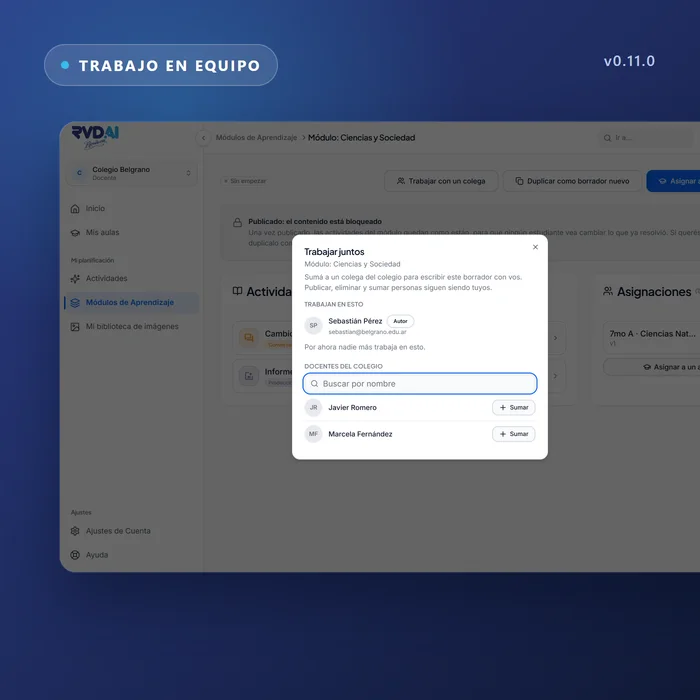
Two teachers in the same draft
Each one sees the other's changes and nobody overwrites what the other wrote.
You can invite a colleague to work on a module or an activity. Sharing is a single dialog: who already works on the piece and, below, the teachers at your school, so you can add someone without typing an email.
School library
The modules the rest of the school builds
Each teacher decides which of their modules go into the school library. Whatever is there can be opened, copied and adapted. What you do not share stays yours alone.
Archive
The previous platform's archive opens in seconds
The school brings over one of its previous classrooms with its people, and the history reads in summary and classroom tabs. What is in the archive is there to consult; new work happens here.
Activity creator
The creator asks one thing at a time
Each screen says what is happening and what is still missing. The material you attach becomes part of the request: a chapter, a guide or a case is enough as a complete request, and a topic written next to it narrows it down.
Integrations
Google Classroom shows what changes before you accept
The school chooses which classes become classrooms, sees who arrives in each row with their email and what is already known about that person, and accepts only the differences it wants. Each sync keeps a record of what changed.
Roster
The school declares the academic year
The school sets its school year. A division keeps its people when the calendar changes, next year's cohorts can be prepared ahead of time, a student can move to another division, and anyone who leaves can still be found. The year pass is a screen that school leaders read and confirm.
Activity types
Theoretical content: a conversation about your text
The student reads the material you provided and then talks about it. It is the type to use when the material is yours and you want to know how it landed. The type catalog explains what each type is for and when to choose it, and its search covers the whole catalog.
Participation
Formulas and links look like what they are
Everything the platform writes is rendered: a formula shows as a formula and a link as a link, on every screen. What the student writes is kept exactly as written, because it is evidence of their work. Each form field tells a screen reader what it is.
Help
What's new, inside the platform
A What's new panel announces what changed, with the date and the place to see it. Each entry is written for the role that reads it.