
RVD.AI · Version 2.25.0
Help for each role, and Berni at the door.
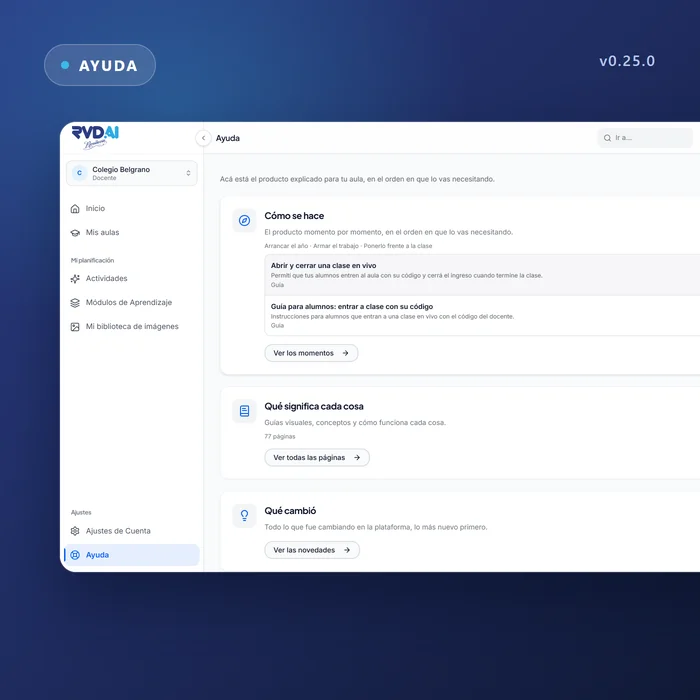
Illustrated guides for each role with all the documentation inside the platform, Berni greeting you at sign-in, and a new version of the terms and the privacy policy.
WHAT'S INCLUDED
The changes in this update.
Help
Help written for your role
Three doors: how it is done, what each thing means and what changed.
The documentation is read inside the platform, in your language, and every working screen has a door to the pages that explain it. The same help exists for school leaders, for students and for families, each in their own words.
Help
Seventy-seven pages that explain the product
Concepts, guides for each moment of the school year and guides for students, with search and a filter by type. When a translation is behind, the page says so.
Sign-in
Berni greets you as you come in
The sign-in panel shows Berni, the teaching assistant that guides students within the purpose their teacher set. The same screen offers a way into a live class with the code on the board.
Legal
Terms and privacy policy, version 2
The legal documents are now versioned. Anyone who accepted the previous version sees a screen that explains what changed and asks them to accept again before continuing. Every future change will be shown there before it applies.
Free plan
The free plan for schools grows
The free school plan's weekly AI allowance grows, and its monthly cap grows with it to stay in step with the week.
Teachers
School lists you can search and sort
The administration lists can be searched and sorted, and they show each entry's status. An invitation keeps the name it was addressed to all the way to the account it creates.
On the phone
Buttons sized for a finger
Every field and button reaches the minimum touch size, the button to show the password can be tapped, and the password can be read before it is sent.