
RVD.AI · Version 2.21.0
The class report, objective by objective.
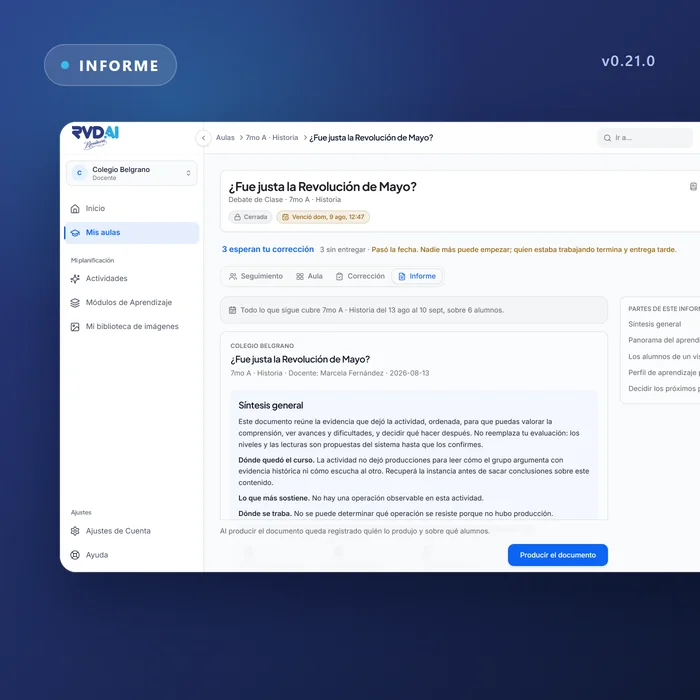
A report per activity that reads as prose written for the teacher, a dashboard with four views you can share by link, and a single due date.
WHAT'S INCLUDED
The changes in this update.
Report
A report that talks to the teacher
Who reached what, at what level, and what to do next.
Objective by objective, reading what the evaluator wrote: a list and a paragraph per student, the point that needs attention opening the text, and groups formed by what to work on. The report is written for the activity type and in your account's language; while it is being drafted, the sections hold their shape.
Review dashboard
Four views: Tracking, Classroom, Correction and Report
The dashboard states whether the class is in progress and behaves accordingly. Each view has its own address in the browser, so the link you land on is the one you can send to a colleague.
Assignments
A single due date governs submission
Once the due date passes nobody can start; anyone with an attempt in progress finishes it and submits it marked late. A submitted page that nobody graded no longer reads as abandoned, in the grid or in grading.
Invitations
The school opens its door with a link
A school link lets teachers join without an individual invitation, and the person responsible for the school claims it from their email.
School classrooms
School leaders see what is published in each classroom
A content tab in the classroom shows which activities and modules its teachers put in front of students.
Fill in the blanks
One decision reaches everyone who answered the same way
When you accept an answer that was on hold, the decision reaches every student who wrote the same thing and is recorded so you can undo it.
My classrooms
Classrooms say what is happening
A classroom that no longer exists says so instead of failing silently, and sign-out stays within reach on short screens too.